
My btconnect.com email does not work in Outlook. What are my options?
Just want to check your emails?
If you just want to check your emails then login to your btconnect.com email account at https://outlook.office.com/mail/ or the BT website.
If you want to continue using Outlook?
If your btconnect.com email has suddenly stopped working in Outlook, you're not alone. Thousands of BT customers are discovering they can no longer use Outlook in the way they always have. The good news is you don't have to give up Outlook—you simply need a modern email system. Carry on reading to learn more
Why btconnect.com email addresses no longer work in Outlook
If you have been using Microsoft Outlook to access your @btconnect.com email address then upcoming changes by BT means you will no longer be able to access these emails via Outlook. This change might have already happened to you or will it happen very shortly (as of May 2023). Further details can be found on the BT website.
Why can’t I continue to access my emails via Outlook?
It’s a good question because BT are forcing you to change your working habits. The change is due to changes being made by the Microsoft as part of something called modern authentication.
Your @btconnect.com email address is hosted by an old Microsoft system which uses a security method called basic authentication. It is this basic authentication which is no longer being supported by Microsoft. As a result the only way you will be able to access your @btconnect.com emails is via a web browser.

How do I access my emails?
You will be able to access your emails via your web browser (Chrome, Edge, Firefox, Safari) by going to www.outlook.office.com or via the BT website. The user interface is not dissimilar to Outlook but it is certainly not the same as the Outlook you have been using. And if you’ve been using Outlook for years it is certainly no substitute.

What about all my old emails?
Because @btconnect.com email addresses work on the POP3 protocol this means that the bulk of your emails will remain on your computer in Outlook. And this is where they will stay. And new emails will only be visible via the web browser as explained above. Therefore it is likely you will have to switch between Outlook and the webmail version to view old emails and new emails. If you want to reply to an old email in Outlook then unfortunately you won’t be able to.
Keep using Outlook by Modernising Your Email System
If your business relies on Outlook and you're tired of switching between Outlook and webmail, I can help you:
- Set up a professional business email address
- Move your existing Outlook emails
- Configure Outlook on all your devices
- Ensure customers can still contact you during the transition
Fixed price of £120
Continue using Outlook just like you used to
- Send and receive emails through Outlook
- Access emails on multiple devices
- Synchronise contacts
- Synchronise calendars
- Access old emails
You can achieve all of this by moving to Microsoft 365 Exchange Online and creating a new professional email address.
I have migrated many small businesses from btconnect.com, IMAP and POP3 email systems to Microsoft 365 Exchange Online
Get your new professional email address setup for £120
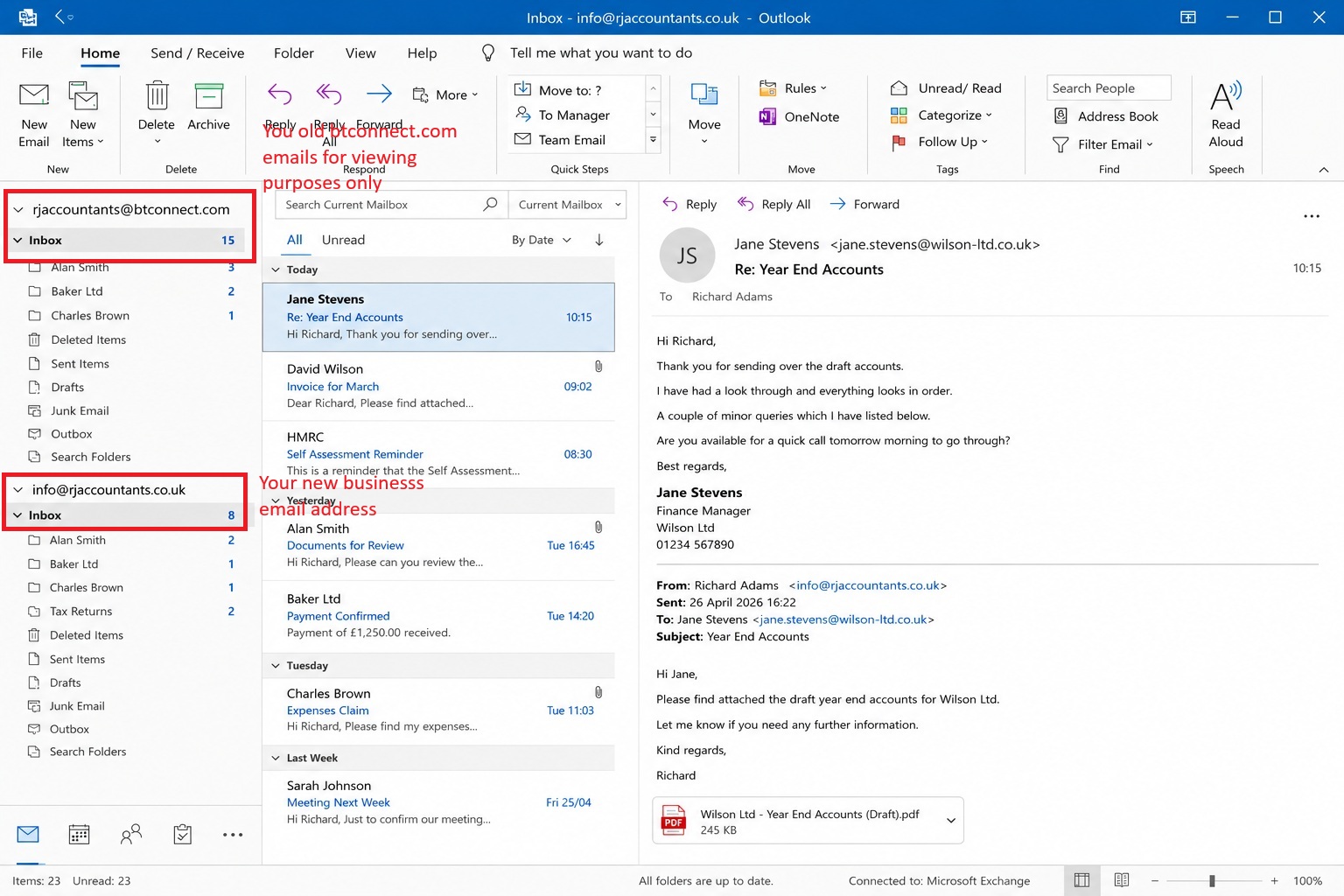
This is what your Outlook could look like
Your old btconnect.com emails (viewing only) sitting side-by-side with your new business email address.
You'll be back to using Outlook for managing your business - just like you used to.
Step 1 - Get a Professional Email Address
Let’s assume you have an accountancy business called RJ Accountants and your current email address is:
rjaccountants@btconnect.com.
Now imagine having an email address of:
info@rjaccountants.co.uk.
Which one looks more professional to you?
To setup a professional email address you need a domain name and an email hosting service such as Microsoft 365. We can help you with every step.

Step 2 - Setup new email address in Outlook and see your old btconnect.com emails at the same time
If you open Outlook on your computer you will still see your btconnect.com emails but it won't have updated emails since 2023. It is possible to add a new email address to Outlook which you will start using for your business. Now you can carry on using Outlook for emails which is a system you are used to and are familiar with. You will be able to refer back to your old btconnect.com emails as well as have access to all your contacts and address book.
Step 3 - Setup auto-forwarder on your btconnect.com email address
As you transition to your new email address you will want to setup an auto-forward on your current @btconnect.com email address to your new email address. You can also setup an auto-reply on your @btconnect.com to tell your customers about your new email address but at the same time assure them that your email will have been received and you will reply accordingly.
The auto-reply and auto-forwarder can be setup in the webmail Outlook.
Step 4 - Enjoy synchronised email, contacts and calendars
With a professional email system in place you will be able to access your emails on your laptop, phone, iPad and everything will stay synchronised. Read an email on your laptop and then reply on your phone. Check your Outlook calendar on your phone whilst out and about.
Costs to setup a new professional email address
There are several sets of costs for setting up a new professional email address:
Domain name - to have an email address of info@rjaccountants.co.uk you need to buy and own the domain name rjaccountants.co.uk. This will cost around £10 per year.
Email hosting - We recommend that you use Microsoft 365 Exchange Online to host your emails. You can learn more about it read more about it here. The cost is around £45 per year per email address.
Professional setup - We can setup your domain and new professional email address for a fixed price of £120.
We can setup your new professional email address for £120
Keep your btconnect.com and new email address working together
Even after you have setup your new email address you won't lose access to your btconnect.com email address. The trick is to deal with customers one at a time about informing them of your new email address. For new customers they will automatically find you via your new email address. Over time your btconnect.com email address will become redundant and you will solely use your new email address.
Why people move away from btconnect.com
- Sick of checking Outlook and webmail.
- Want email to work on phone, laptop and tablet.
- Want one inbox instead of two.
- Want a professional email address.
- Don't want to worry about future BT changes.
- Want a system their business can grow with.
My Prediction about btconnect.com Email Addresses
According to this forum post on BT website a BT spokesperson says:
there are currently no plans to remove BTConnect email addresses.
Let's focus on the bit "currently no plans". My prediction is that sooner or later BT will delete all btconnect.com email addresses. The whole email system is based on old technology called basic authentication. Eventually Microsoft will retire basic authentication which will result in the end of btconnect.com email accounts.
Therefore my advice is to upgrade your business email address now to your own domain based email, as outlined above. The sooner you do this the longer you have to make the transition by informing customers and clients of your new email address. And once you have moved you will ask yourself "Why didn't I do this years ago".
Need help moving away from BT Connect?
If your business relies on Outlook and you're tired of switching between Outlook and webmail, I can help you:
- Set up a professional business email address
- Move your existing Outlook emails
- Configure Outlook on all your devices
- Ensure customers can continue contacting you during the transition
FAQ
Here are answers to the common questions we get. If you have any other questions please reach out to us via the contact form below.
Contact Us
To discuss how we can help you transition to a better way of working then fill in the contact form below.